Built-to-Order Operations System
DATA·OPS
Environment, utilities, production and maintenance
in one view and one record
An operations system DXDY builds to order for each plant. We design it around four pillars — data acquisition, monitoring, energy and asset management, and Part 11 — and handle development, installation and validation. Control stays with the PLCs and BMS next to the equipment; DATA·OPS monitors, approves and records.
The mockup uses sample data and Korean-language screens. Actual screens are designed for each site, in your language.
Process
DXDY handles it from request to operation
This is not a package you buy and configure — we build it new for each plant.
01
Site assessment
We review equipment, instrumentation, existing systems and operating procedures, and give you an equipment integration requirements document.
02
Screen and rule design
We define floor and equipment layout, alarm limits, operating permissions and zone policies, and confirm them with mockups.
03
Development · integration
We develop the system connected to your site systems — PLC, BMS, MES, CMMS and others.
04
Installation · validation
We install on site, then verify and document operation following IQ/OQ test procedures.
05
Operation · change control
After go-live, changes and extensions follow change control, with ongoing maintenance support.
Architecture
Control at the equipment, acquisition by SemantiQ-Core, operations by DATA·OPS
Equipment control stays with the PLCs and BMS next to the equipment. SemantiQ-Core collects the values; DATA·OPS sits on top to monitor, decide, pass on approved commands and record. MES and CMMS remain the systems of record.
Field
Equipment and sensors — control by equipment and BMS vendors
HVAC · refrigeration
AHUs · chillers · BMS (control happens here)
Utilities · power
PLCs · meters · electricity · gas · water
Environmental sensors
Temp/humidity · ΔP · cold storage · chambers · doors
Card readers
Employee badge taps
Production equipment
Run · count · fault signals
Passed down: Sensor values · equipment status (Modbus · OPC UA · BMS)
Passed up: Approved setpoints · modes · start/stop (write allow-list only)
Acquisition
Read and store under one tag convention
SemantiQ-Core gateway
Modbus · OPC UA · freshness · calibration · history
Passed down: Current values · history · events
Passed up: Operation requests
DATA·OPS
Monitor, decide, approve and record
Environmental records (GMP)
Alert/action limits · signatures · reports
Alarm management
Priority · flood monitoring · off-hours escalation
Operation approval · records
Badge taps · signatures · audit trail
Energy · asset management
Zone operation · WAGES · run-based maintenance
Production · maintenance link
Reads MES · CMMS, supplies measured data
Passed down: Operations screens · alarms · reports · results
Passed up: Work orders · alarm acknowledgement · signatures
Use
People and in-house systems
Central monitoring room
Operations screens
Control room
Video wall
QA
Environmental reports · review signatures
MES · CMMS
Receive work orders · PM schedule, send results · run hours
Shown for a standard configuration. Integrations and features are decided per site.
Features
Four pillars
Data acquisition, monitoring, energy and asset management, and Part 11. Every plant has different equipment and operating rules, so we choose the features each one needs — and every screen is designed so operators don't make mistakes.
Data acquisition
One tag convention
Names that differ by equipment vendor are mapped to a single site › floor › room › equipment › measurement convention. Every value carries its freshness and sensor calibration status, so a lost signal is never mistaken for zero.
Monitoring · ISA-101
Gray when normal, color for problems
Normal states recede into neutral gray and only abnormal ones show color. Shift operators find what needs attention among hundreds of values at a glance. HVAC, environment, production and maintenance share one screen.
Alarms · ISA-18.2
Only the alarms that matter first
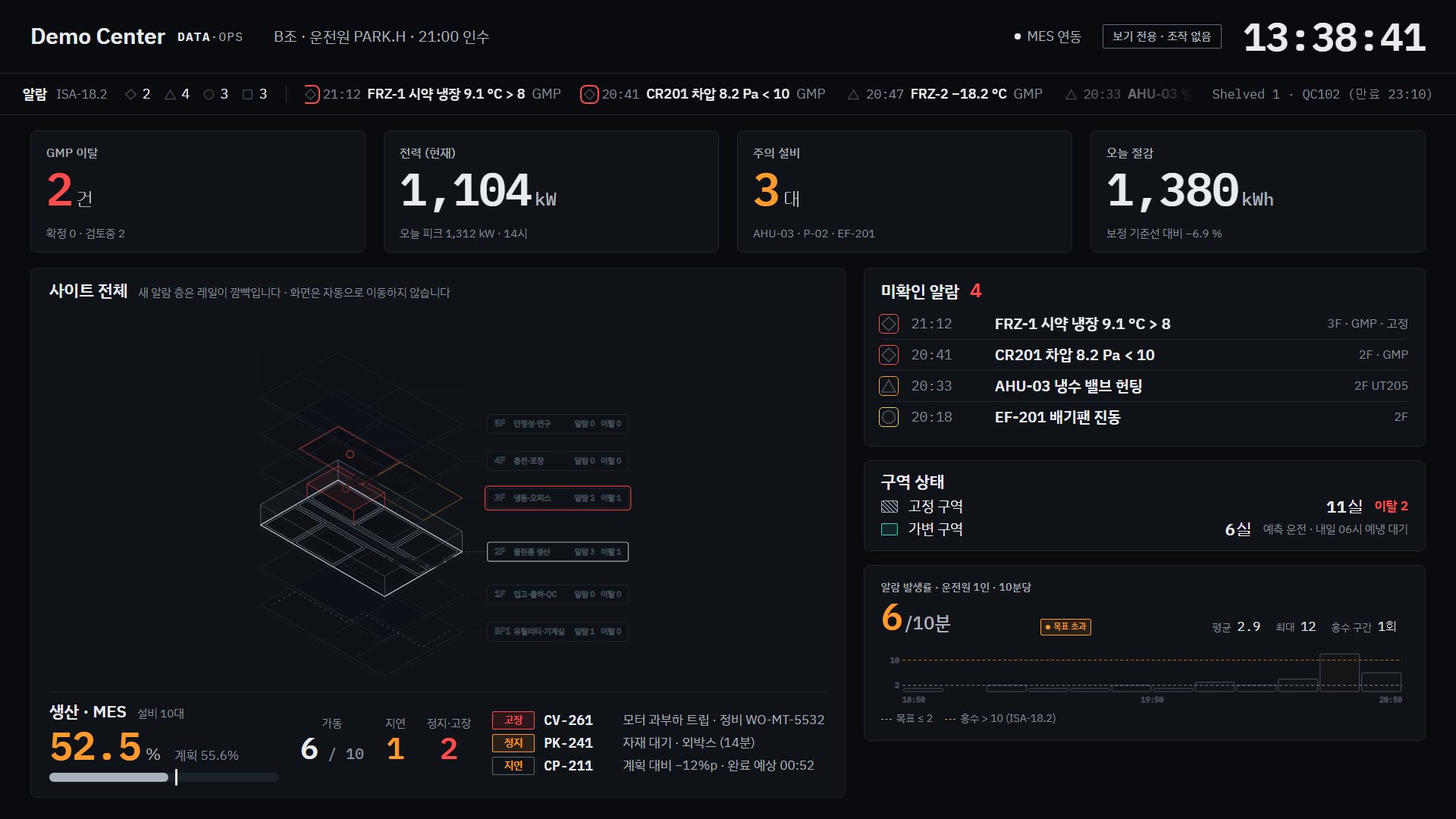
Four priorities are distinguished by both color and shape (◆▲●■), and alarms per 10 minutes are tracked to catch alarm floods. Environmental alarms have separate alert and action limits.
Environmental records · GMP
What you see is the record
Cleanroom temperature, humidity and differential pressure, cold and frozen storage, and stability chambers are kept as regulated records. Acknowledgement requires a signature, night alarms escalate by SMS and phone, and environmental reports can be produced by period and area.
Energy · asset management
Protect what must be protected, save on the rest
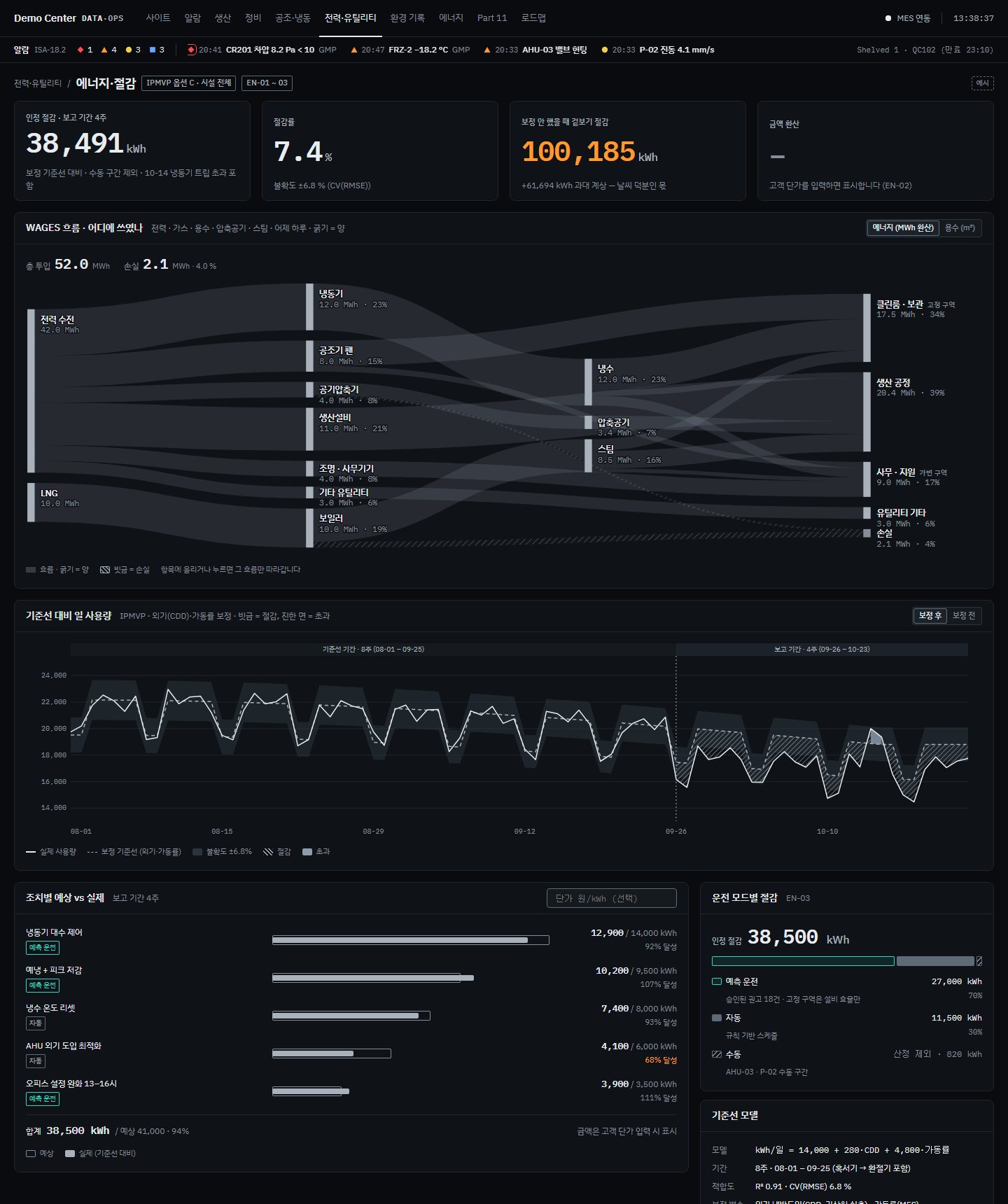
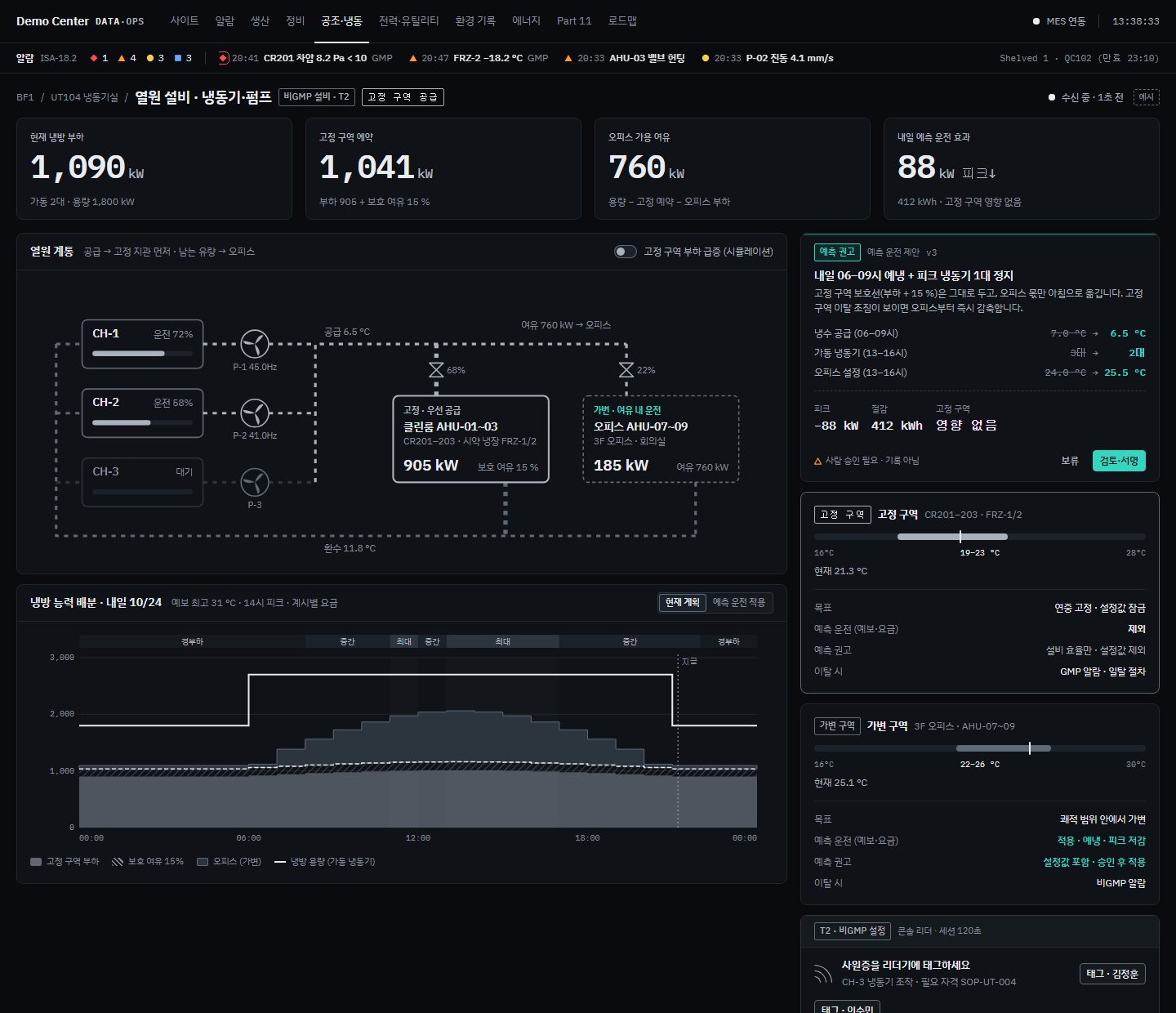
Setpoints are locked in controlled-environment zones, while office zones run on weather and tariff forecasts. It shows where electricity, gas, water, compressed air and steam went, and proves how much was saved against a baseline.
21 CFR Part 11
Operation records · validation
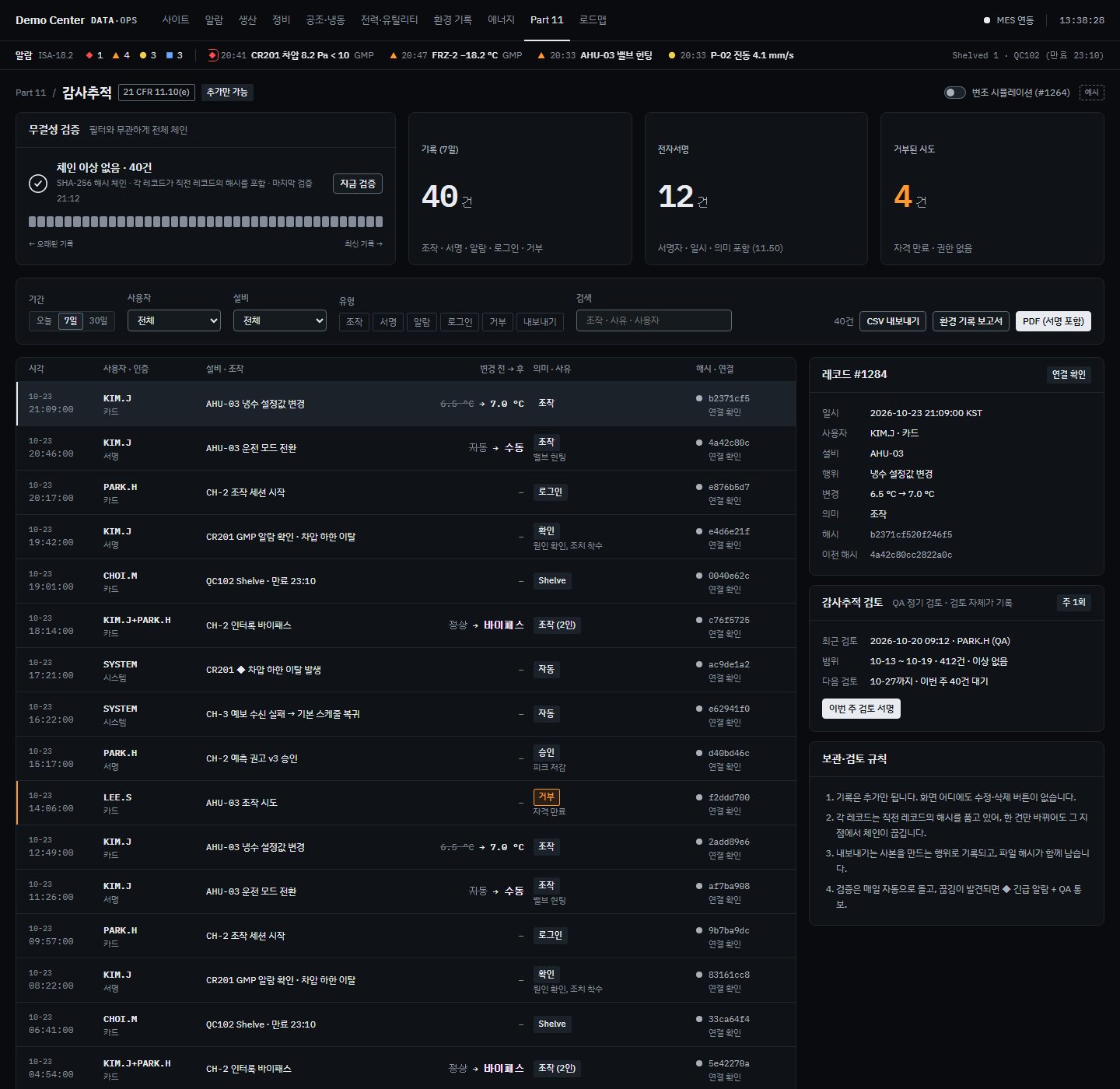
Equipment operation starts with an employee badge tap, and depending on risk requires a signature or two-person approval. The append-only audit trail is hash-chained, and validation documents (URS, IQ/OQ) are delivered with the system.
Screens
Screens
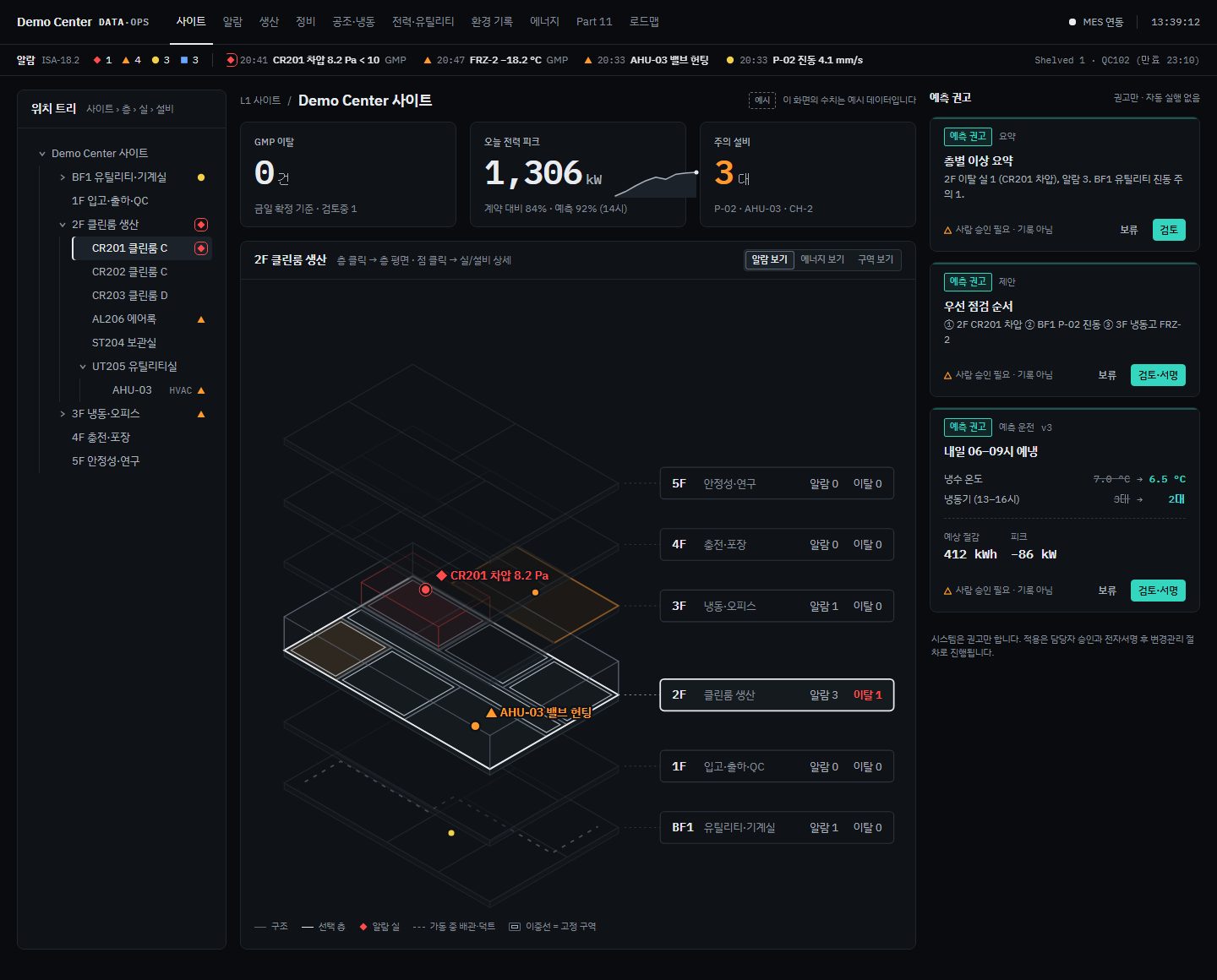
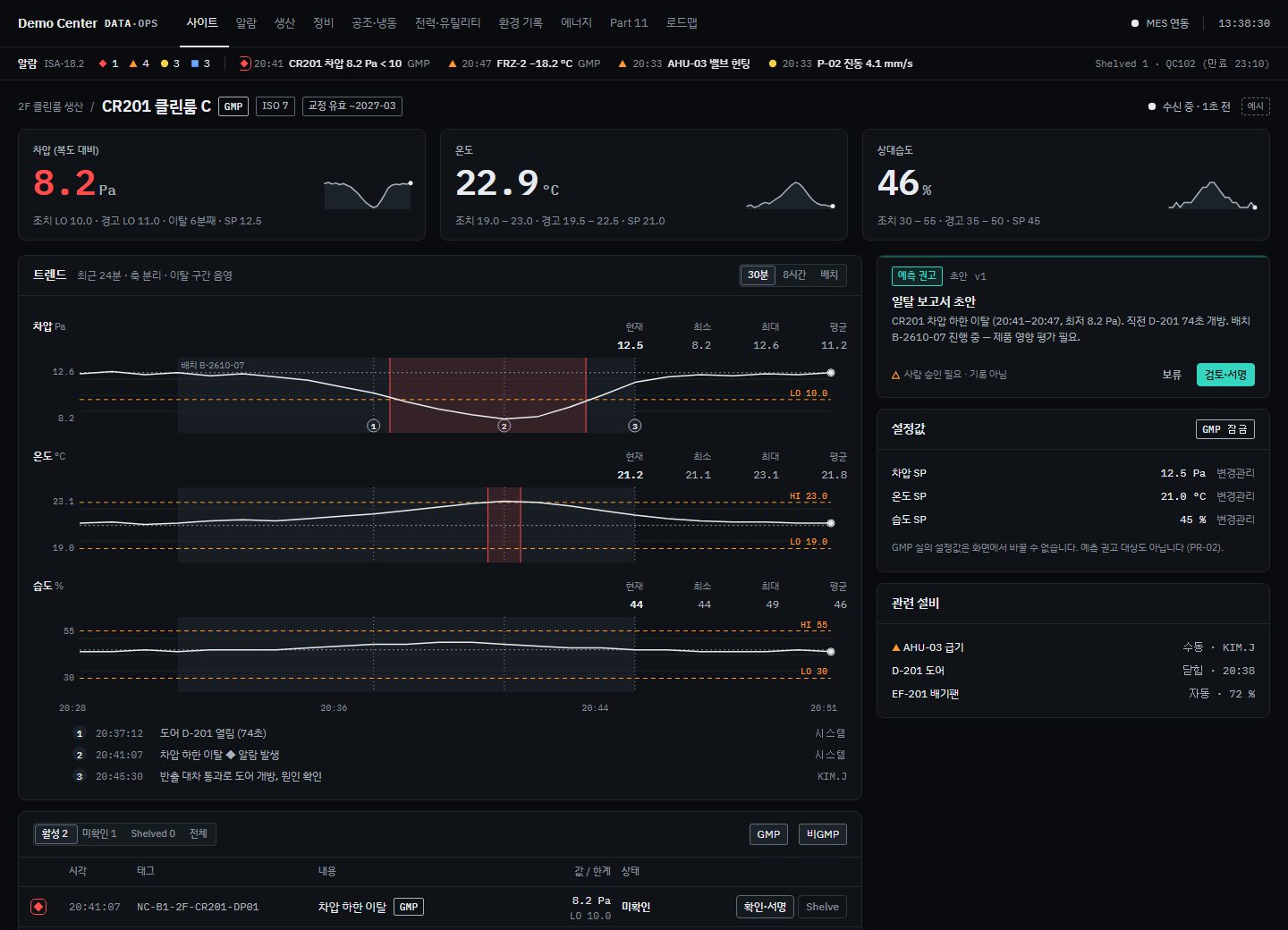
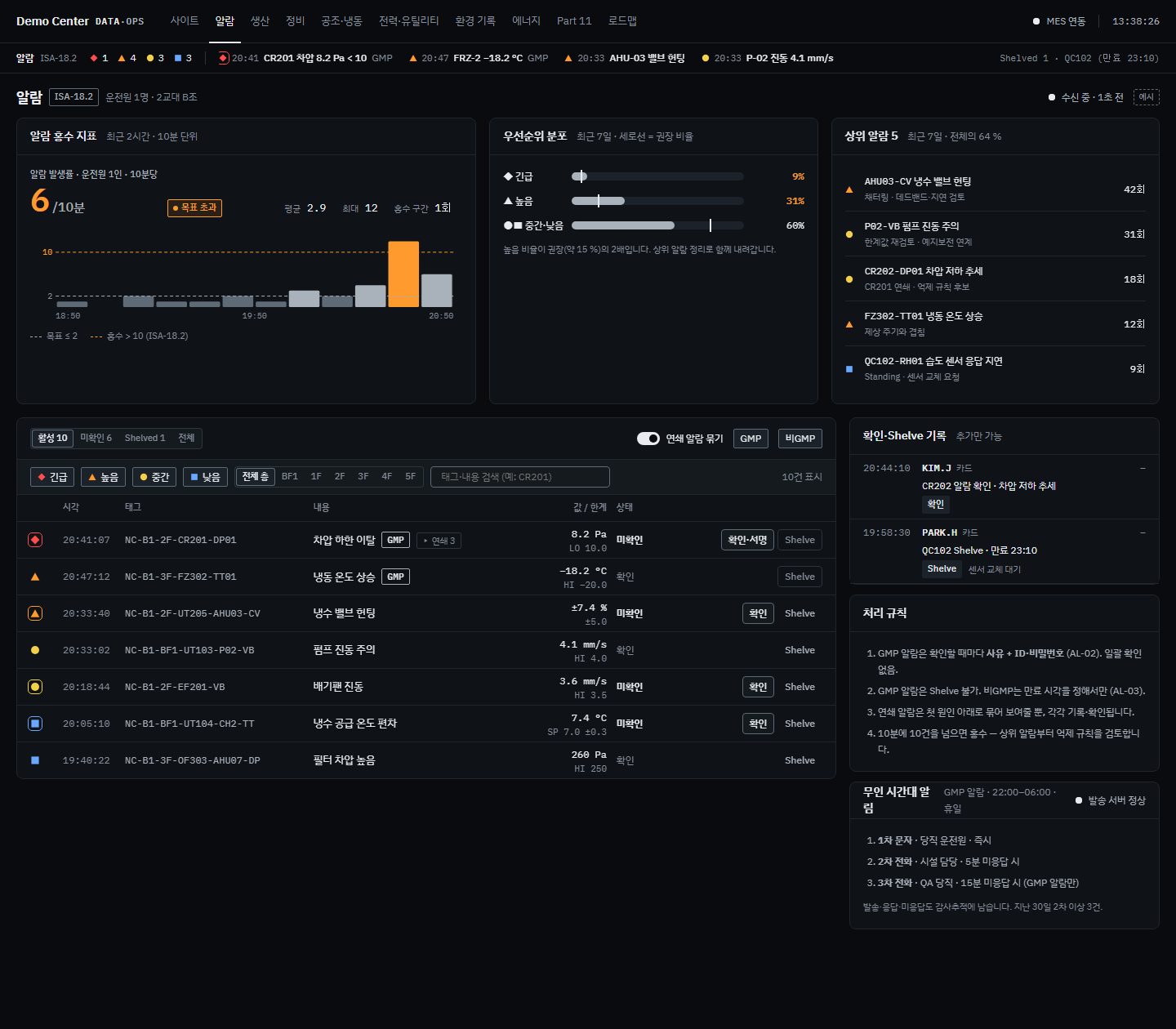
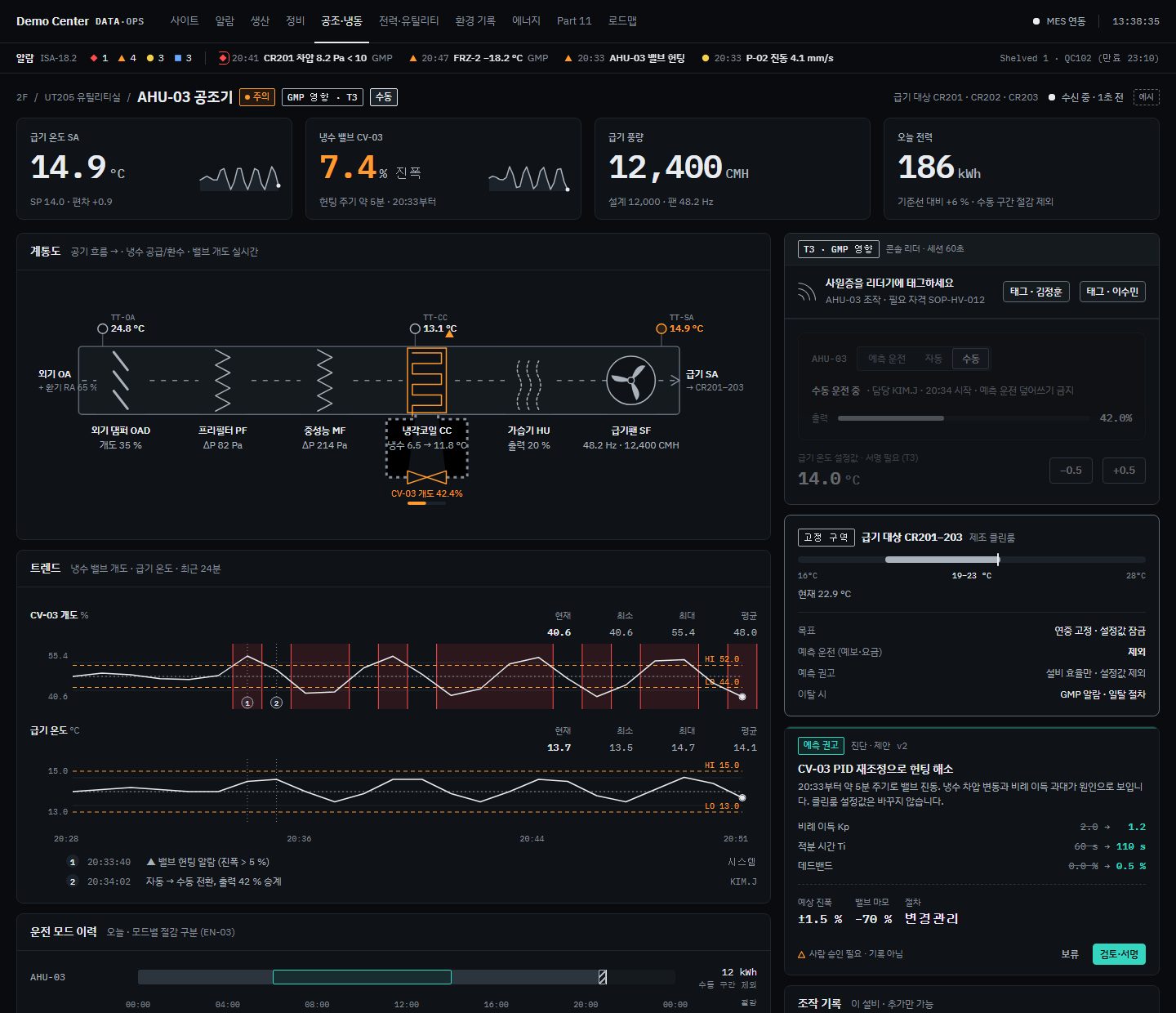
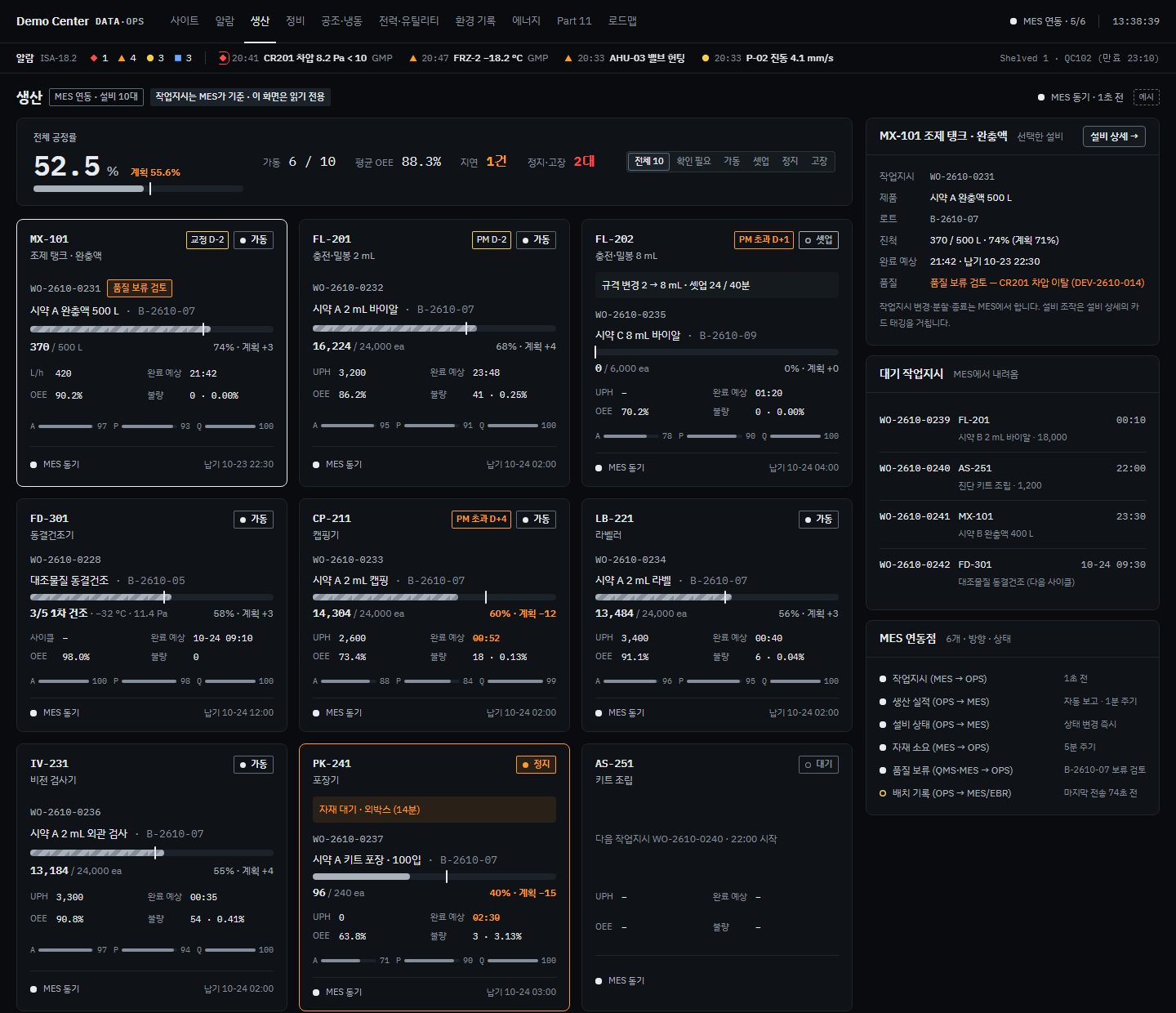
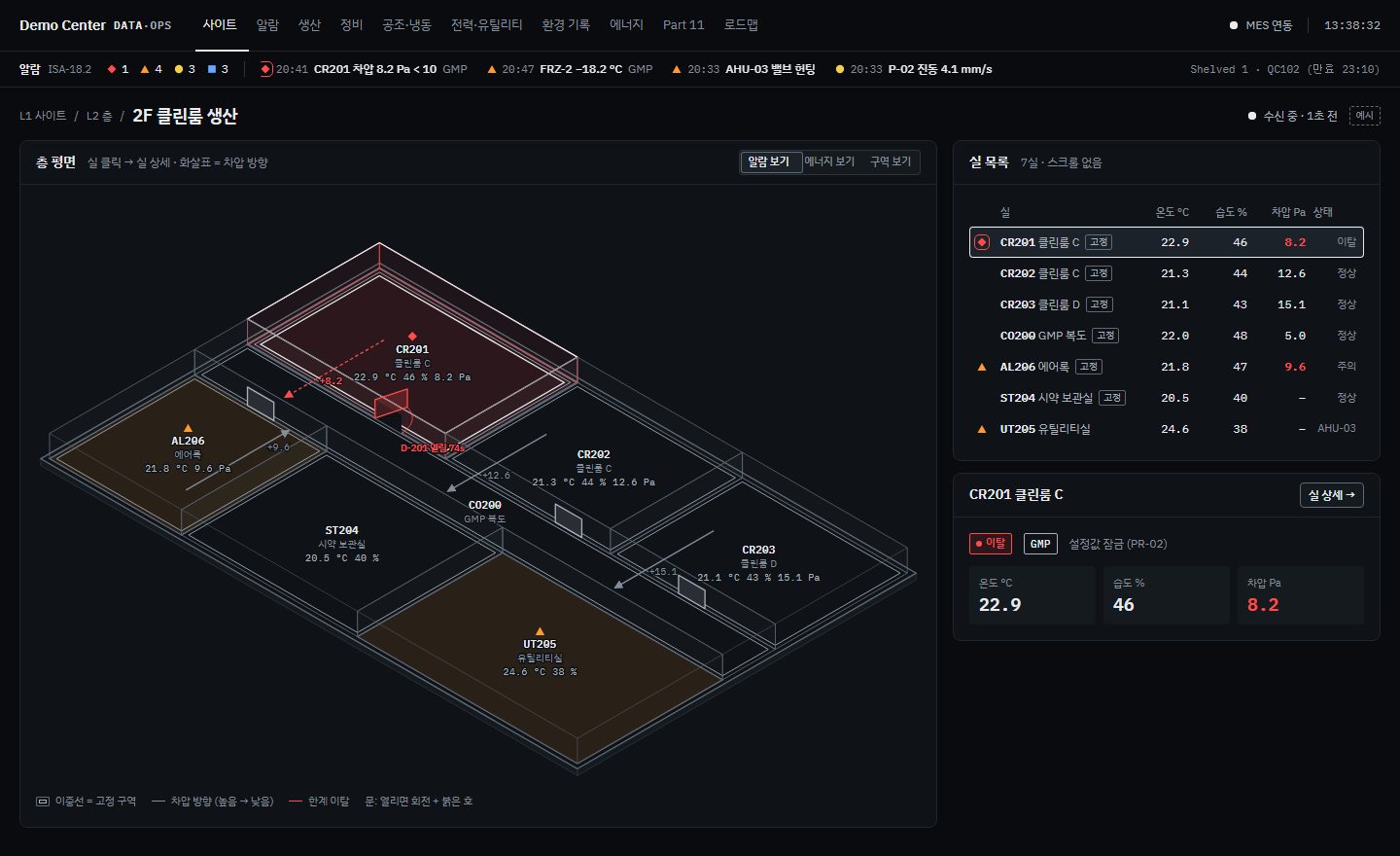
Sample screens, shown in Korean. You can click through them in the interactive mockup.
Specification
Feature specification
Shown for a standard configuration. We pick the features each site needs when we build it.
- Tag model
- One site › floor › room › equipment › measurement convention. Vendor-specific names are mapped in the acquisition layer; the mapping table is under change control
- Equipment connectionModbus · OPC UA
- Reads PLCs, BMS and meters directly, and exports to upper systems over OPC UA
- Freshness
- Each value shows live, N seconds ago, or lost. Lost values are kept with their last received time, not cleared
- Calibration status
- Calibration validity of environmental sensors is attached to the value; readings from expired sensors are flagged as excluded from records
- Remote operation
- Setpoints, operating modes and start/stop are passed to equipment after approval. Anything outside the equipment vendor’s write allow-list never appears on screen
- Integration requirements
- A one-page attachment for purchase specs before equipment is ordered — communication, read/write points, alarm list, time sync, calibration certificates
- Site dashboard
- Stacked-floor view with alarms and excursions per floor, key indicators and predictive recommendations
- Floor plan
- 3D floor plan with temperature/humidity and differential pressure per room, door status, airflow direction, controlled and flexible zones
- Room detail
- Differential pressure, temperature and humidity trends, alert and action limits, excursion periods and notes
- Equipment detail
- Schematic, operating mode, and the alarming part on the equipment outline
- Alarm priorityISA-18.2
- Four levels distinguished by color and shape (◆▲●■), flood monitoring by alarms per 10 minutes, cascading alarms grouped under their cause
- Shelve · acknowledge
- Shelving with a fixed end time. Quality-related (GMP) alarms cannot be shelved and require a signature to acknowledge
- Production · maintenance linkMES · CMMS
- Progress, running units, delays and faults per work order, with maintenance schedules overlaid on production. Existing systems remain the reference
- Video wall · shift handover
- Control room display; at shift change, open alarms, shelved alarms and work in progress are handed over on one page
- Quick search · themes
- Ctrl+K to search equipment and measurements; dark, light, night and high-contrast themes
- Zone policy
- Setpoints locked in controlled-environment zones; only other zones run on weather and tariff forecasts. Spare plant capacity goes to controlled zones first
- Predictive recommendations
- Suggests how to run based on weather forecasts and tariffs; applied only after the person in charge approves and signs
- Energy flowWAGES
- One view of how electricity, gas, water, compressed air and steam pass through which equipment, which zones and processes use them, and how much is lost
- Savings verificationIPMVP
- Expected and actual savings against a baseline adjusted for outdoor conditions and utilization, broken down by operating mode
- Utilization
- Running, standby, stopped and fault time calculated from measured equipment status
- Run-based maintenanceCMMS linkPlanned
- Reads run hours and start counts from equipment and sends them to the maintenance system; alarms become draft work requests
- Environmental recordsGMP · EMS
- Alert and action limits for cleanroom, cold storage and chamber values. Action limit breaches go to the deviation process
- Acknowledgement signatures
- Every GMP alarm acknowledgement requires a reason and signature. No bulk acknowledge
- Unattended-hours escalation
- Night and holiday GMP alarms escalate SMS → phone → next on-call, with sends, responses and non-responses recorded
- Environmental record report
- Values, limits, alarms, signatures and calibration status by period and area, as PDF and electronic records
- Lot linkagePlanned
- Takes the MES lot, room and time window to produce “the environmental record while this lot was made” in one step
- Deviation draftPlanned
- On an action limit breach, a draft pre-filled with time, equipment, value, duration and affected lots. The deviation system follows the customer’s QA
- Badge taggingT1–T4
- Equipment operation only within a session opened by badge tap, four risk levels, two people for the riskiest actions. Qualifications are checked against the customer’s HR records
- Electronic signatures11.50
- Records the meaning of the signature (review, approval, etc.) and re-verifies identity
- Audit trailHash-chained
- Who, when, what, and before/after values. Append-only, and any record altered in between is detected. Periodic QA reviews are also recorded with signatures
- Time · retention · accounts
- NTP sync with a log of time changes, retention per customer SOP, admin and QA account policies
- Validation documentsGAMP 5
- We prepare URS, FS/DS, risk assessment, IQ/OQ and traceability matrix, and execute IQ/OQ. Approval, PQ and SOPs remain with the customer’s QA
Everything plant operations need
Integration with existing systems
Connects to PLCs, BMS and meters over Modbus and OPC UA. Before equipment is ordered, we supply integration requirements (communication, read/write points, alarm list) for your purchase specification.
MES · CMMS integration
Work orders and maintenance schedules stay owned by your existing systems. We feed them status, run hours and alarms read directly from equipment, and overlay both schedules on one screen.
Equipment wireframes
Click a piece of equipment to see which part raised the alarm on its outline wireframe. Existing 3D models of your equipment can be used as is.
Night and high-contrast themes
A dark theme for night shifts and a high-contrast theme are included. Text and button contrast is checked against accessibility criteria.
An operations system made for your plant, designed with you
Send us your floor layout, equipment list and operating rules, and we start with a mockup.